


You've probably heard someone say "it takes up to 48 hours for DNS changes to propagate" and nodded along without fully understanding why. Or maybe you've been confused when your web developer asks about your "DNS authority" versus your "domain registrar." You're not alone.
"The entire internet is based on DNS," says Brandon Hubbard, Technical Account Manager at Tapp Network. "Understanding DNS is key to understanding the web—and it's far less intimidating than most people think."
Let's break it down.
What Is DNS, Really?
DNS stands for Domain Name System, and it works like the internet's phonebook. When you type a website address like "tappnetwork.com" into your browser, your computer doesn't actually know where to go. Computers communicate using IP addresses—strings of numbers like 192.0.2.1. DNS is the system that translates the human-friendly domain names we use into the IP addresses computers need.
Think of it this way: you don't memorize phone numbers anymore because your phone stores contact names. DNS does the same thing for the internet, connecting easy-to-remember names to the technical addresses that make connections possible.
The Key Players You Should Know
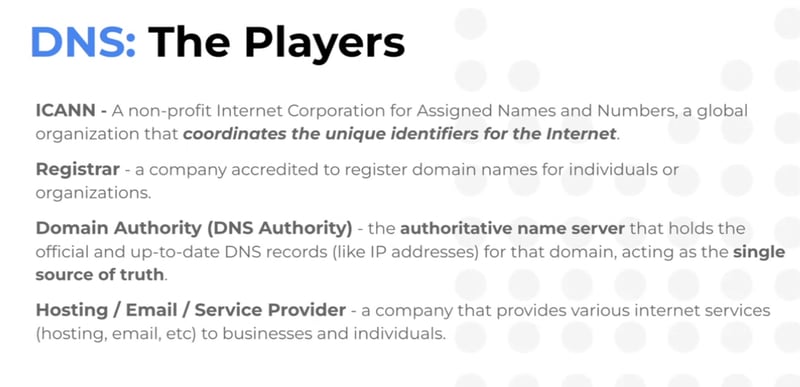
Understanding DNS becomes much easier when you know who's involved:
ICANN is the global nonprofit organization (Internet Corporation for Assigned Names and Numbers) that coordinates all the unique identifiers for the internet. They're essentially the governing body that keeps the whole system organized.
Registrars are companies accredited to sell domain names. When you purchase "yourcompany.com," you're buying it through a registrar like GoDaddy, Namecheap, or Google Domains.
Domain Authority (DNS Authority) is the authoritative name server that holds the official, up-to-date DNS records for your domain. This is the single source of truth for where your website and email actually live.
Hosting and Service Providers are the companies that actually store your website files, manage your email, or provide other internet services.
Here's what trips people up: these can all be different companies. You might register your domain with GoDaddy, host your website with WP Engine, use Google Workspace for email, and have Cloudflare as your DNS authority. Each plays a distinct role.
Understanding DNS Records
Your DNS contains several types of records, each serving a specific purpose:
A Records point your domain to an IPv4 address (the standard format like 192.0.2.1). This is typically how your main website gets connected.
AAAA Records do the same thing but for the newer IPv6 addresses, which are longer and look like 2001:0db8:85a3::8a2e:0370:7334.
CNAME Records act as aliases, forwarding one domain to another. This is useful when an IP address might change—instead of pointing directly to an IP, you point to another domain name that handles the routing.
MX Records direct email to the correct mail server. If you use Google Workspace or Microsoft 365 for email, you've added MX records pointing to their servers. These records include a "priority" field that tells email servers which server to try first.
TXT Records store text information and are commonly used for verification and security. SPF, DKIM, and DMARC—all those email security protocols you may have heard about—use TXT records.
The Truth About the "48 Hours" Thing
One of the most common questions we hear is why DNS changes aren't instant. The answer lies in something called DNS propagation.
"DNS propagation is like updating your contact info in thousands of different phonebooks around the world," explains Hubbard. "Each phonebook updates at its own pace."
Here's what actually happens when you make a DNS change:
First, you update a record on your authoritative DNS server. But DNS servers worldwide have cached (saved) copies of your old record. Each cached copy has a TTL (Time To Live)—an instruction telling the server how long to hold onto that information. Once the TTL expires, the server discards the old record and fetches the new one.
The 48-hour window is a worst-case scenario based on older, longer TTL settings. In practice, if your TTL is set to a shorter duration, changes can propagate in minutes. Want faster propagation? Lower your TTL ahead of time, wait for the old records to expire, then make your change.
One important caveat: TTL doesn't have to be respected. IT departments sometimes hardcode DNS settings locally, which can cause confusion during transitions.
Why This Matters for Your Organization
Understanding DNS helps you in several practical ways:
Troubleshooting becomes easier. When your website or email isn't working, knowing where to look—registrar, DNS authority, or hosting provider—saves hours of frustration.
You maintain control. Knowing who holds your DNS authority means you always know where to make changes. We've seen organizations lose access to their own domains because they didn't understand the distinction between their registrar and their DNS provider.
Security improves. Properly configured DNS records (especially email authentication like SPF, DKIM, and DMARC) protect your organization from spoofing and improve email deliverability.
You can make informed decisions. When your technical team recommends changes, understanding the basics helps you ask the right questions and avoid costly mistakes.
The Bottom Line
DNS isn't as complicated as it seems—it's simply the system that connects the human-readable web addresses we use to the technical addresses computers need. Once you understand the key players and basic record types, you'll find that DNS becomes far less intimidating.
As Hubbard puts it: "The goal isn't to become a DNS expert. It's to understand enough that you're not afraid of it—and that you know the right questions to ask."
Have questions about your organization's DNS setup? Contact Tapp Network to learn how we can help optimize your web infrastructure.