

Boys and Girls Clubs, as well as similar programs, face a common operational challenge: disconnected systems that hinder efficient scaling. Spreadsheets for donor tracking, paper forms for member registration, and email lists managed across multiple platforms create administrative bottlenecks that limit impact. Impressively, Boys & Girls Clubs of America recently deployed a Salesforce-based CRM to 350 Club locations, serving more than 2,500 users, in just nine months. Each new Club was onboarded in under 90 days. This is lightspeed, but it might have left a lot on the table...
While Salesforce and HubSpot provide similar CRM capabilities, HubSpot stands out as an integrated platform that connects programs to donors, members to staff, and data to decision-making, and has powerful AI capabilities. This guide walks you through the implementation of HubSpot's CRM, Marketing Hub, Sales Hub, Service Hub, and Operations Hub to streamline your Club's operations.
Setting Up HubSpot CRM as Your Central Database
HubSpot's AI-powered CRM provides a single operational backbone for Clubs, unifying member data, program engagement, and staff workflows in one system. Before automation or reporting can deliver value, the CRM must be structured correctly. That starts with defining the data model that reflects how Clubs actually operate—members, programs, families, and participation over time.
Step 1: Structure Your Contact Database
Create custom properties in HubSpot CRM to track member-specific data. Navigate to Settings > Properties and add fields for member registration date, program enrollment, age group, attendance frequency, and family contact preferences.
Step 2: Set Up Contact Segmentation
Build lists in HubSpot to organize contacts into actionable groups. Create active lists for current members, prospective families, active donors, lapsed donors, monthly giving participants, and program-specific enrollees. These lists auto-update based on the criteria you define.
Step 3: Import Existing Data
Use HubSpot's import tool to migrate data from spreadsheets and legacy systems. Map your existing fields to HubSpot properties during import to maintain data continuity. Clean duplicate records using HubSpot's duplicate management tools.
Rolling out HubSpot in under 90 days is achievable with the right sequencing. Tapp Network specializes in phased nonprofit implementations that prioritize early wins while laying the foundation for long-term scale. Contact us to explore a guided 90-day HubSpot implementation workshop for your Club.

Automating Member Communications with Marketing Hub
HubSpot Marketing Hub eliminates manual communication processes. Administrators report saving significant time by removing the need to export reports, build documents, and perform mail merges.
Step 1: Build Welcome Sequences
Create automated workflows that trigger when a new member registers. Navigate to Automation > Workflows and build an enrollment sequence that includes welcome emails, orientation information, program recommendations based on age group, and parent onboarding materials.
Step 2: Set Up Email Templates
Design reusable email templates in Marketing Hub for common communications. Create templates for program announcements, event invitations, attendance reminders, and impact updates. Use personalization tokens to automatically insert member names, program details, and relevant dates.
Step 3: Configure SMS Notifications
Connect HubSpot to an SMS integration through the App Marketplace. Set up automated text reminders for program sessions, pickup times, and schedule changes. Build workflows that send SMS alerts based on specific triggers like low attendance or program cancellations.
Step 4: Create Engagement Workflows
Build automated sequences that adapt based on family engagement. Set up workflows that send re-engagement campaigns to families with declining attendance, success stories to active families, and program expansion opportunities to highly engaged members.
Managing Donor Relationships with Sales Hub
Sales Hub provides tools for systematically managing donor relationships and fundraising pipelines. First-time donor retention stands at 19.4% while returning donor retention reaches 69.2%, making systematic follow-up essential for sustainable fundraising.
Step 1: Create Donor Pipelines
Build deal pipelines in Sales Hub to track fundraising progress. Navigate to Sales > Deals and create pipeline stages for prospective donors, first-time donors, repeat donors, major donor prospects, and monthly giving members. Assign deal values and close dates to forecast revenue.
Step 2: Set Up Task Automation
Create workflows that generate follow-up tasks for fundraising staff. When a donation comes through, automatically create tasks for thank-you calls, impact updates at 30 days, and re-engagement outreach at 90 days. This ensures systematic donor stewardship without manual tracking.
Step 3: Build Donor Scoring Models
Use HubSpot's lead scoring to prioritize donor outreach. Assign points based on donation frequency, total giving amount, email engagement, event attendance, and volunteer participation. Set up automated notifications when donors reach major donor score thresholds.
Step 4: Track Donor Communication History
Log all donor interactions in HubSpot CRM. Use the email integration to automatically track email opens and clicks. Record phone calls, meetings, and event interactions directly in contact records. This creates a complete donor relationship history accessible to all staff.
Retention is where most fundraising systems quietly fail due to inconsistent follow-up and fragmented data. Tapp Network helps nonprofits implement donor pipelines, scoring models, and stewardship workflows that staff actually use. If donor retention is a priority metric for your Club, a short implementation consult can clarify next steps.
Building Monthly Giving Programs with HubSpot's Commerce Hub
Monthly giving now accounts for 31% of all online nonprofit revenue, with revenue from monthly gifts increasing 5% while one-time revenue remains flat (Source: M+R Benchmarks 2025). Donors who give consistently for five years contribute 1,519% more than one-time donors (Source: NeonOne).
Step 1: Create Recurring Payment Forms
Build donation forms in HubSpot with recurring payment options. Connect HubSpot's Commerce Hub to payment processors like Stripe or PayPal through native integrations. Add monthly giving checkboxes to all donation forms with suggested monthly amounts.
Step 2: Set Up Monthly Donor Workflows
Create dedicated workflows for monthly giving members. Build automated sequences that send monthly impact updates, cumulative giving summaries at six months, anniversary recognition at one year, and failure notifications when payments decline.
Step 3: Configure Payment Failure Handling
Build workflows that trigger when recurring payments fail. Set up automated email sequences that notify donors of payment issues, provide updated payment link options, and escalate to staff outreach after two failed attempts.
Step 4: Track Cumulative Impact
Create calculated properties in HubSpot that track total lifetime giving. Use this data in email personalization to show monthly donors their cumulative impact over time. Build reports that segment monthly donors by tenure and total contribution.
Monthly giving infrastructure is often bolted on instead of designed intentionally. Tapp Network helps nonprofits build recurring giving programs that integrate cleanly with CRM, reporting, and donor communications from day one. Contact us if you want to design monthly giving as a system, not just a payment option.
Creating Digital Donation Experiences
44% of the public donated online in the past three months, representing 60% of all charitable donations. Among donors aged 25-34, 56% prefer online donations versus 24% preferring cash. (Source: Donor Pulse 2025 (Insights from Enthuse Intelligence))
Step 1: Build Landing Pages for Campaigns
Use HubSpot's drag-and-drop landing page builder through HubSpot's Content Hub to create campaign-specific donation pages. Navigate to Marketing > Landing Pages and design pages for annual giving, emergency appeals, program sponsorships, and event fundraising. Include compelling imagery, impact statistics, and clear calls-to-action.
Step 2: Implement Conversion Tracking
Set up HubSpot tracking code on all donation pages to monitor visitor behavior. Create conversion events for donation form submissions, monthly giving signups, and volunteer applications. Build reports that show donation conversion rates by traffic source.
Step 3: Configure Thank-You Pages
Design automated thank-you pages that display after donation submission. Include social sharing buttons, additional engagement options, and clear next steps. Use HubSpot workflows to trigger confirmation emails immediately after page view.
Step 4: Set Up A/B Testing
Use HubSpot's A/B testing tools to optimize donation forms. Test different suggested donation amounts, form field configurations, recurring giving placements, and call-to-action button text. Let tests run until statistical significance is reached before implementing winners.
Coordinating Multi-Channel Campaigns
IGNITE National reached millions of audience members over seven months by leveraging HubSpot's integrated tools to manage campaigns, email automations, workflows, landing pages, influencers, ambassadors, advertising, and events from one platform (Source: HubSpot).
Step 1: Build Campaign Infrastructure
Create campaigns in HubSpot that group related assets. Navigate to Marketing > Campaigns and set up containers for annual giving drives, program launches, or awareness initiatives. Associate all emails, landing pages, social posts, and ads with the campaign for unified tracking.
Step 2: Configure Social Media Management
Connect social media accounts to HubSpot's Social Tool. Schedule coordinated posts across Facebook, Instagram, LinkedIn, and Twitter that align with email campaigns. Use HubSpot's social monitoring to track engagement and respond to comments from one dashboard.
Step 3: Set Up Ad Integration
Connect Google Ads and Facebook Ads accounts to HubSpot. Create audiences based on CRM data to target lapsed donors, prospective members, or event registrants. Track ad performance and donation conversions directly in HubSpot reports.
Step 4: Build Cross-Channel Workflows
Create workflows that coordinate touchpoints across channels. When someone clicks an email link, add them to a retargeting ad audience. When they attend an event, trigger a social media thank-you and follow-up email sequence. Build workflows that adapt messaging based on which channels each contact engages with most.
Tracking Member Engagement with Service Hub
Service Hub provides tools for managing member relationships and identifying at-risk youth before they disengage.
Step 1: Set Up Attendance Tracking
Create custom objects in HubSpot for program sessions and attendance records. Build workflows that log attendance when members check in. Associate attendance records with member contact records to maintain a complete participation history.
Step 2: Build Engagement Scoring
Create calculated properties that measure member engagement. Track attendance frequency, program diversity, family event participation, and communication responsiveness. Build scores that identify highly engaged members and those showing declining participation patterns.
Step 3: Configure Early Warning Systems
Set up workflows that trigger alerts when member engagement drops. When a member misses three consecutive sessions, automatically notify program coordinators. When engagement scores drop below thresholds, trigger outreach workflows to families.
Step 4: Create Member Feedback Loops
Use HubSpot's survey tools to collect member and family feedback. Build automated surveys that deploy after program milestones, at semester ends, or following specific events. Route survey responses to appropriate staff and trigger follow-up workflows based on satisfaction scores.
Building Operational Reports with Data Hub (Formerly Operations Hub)
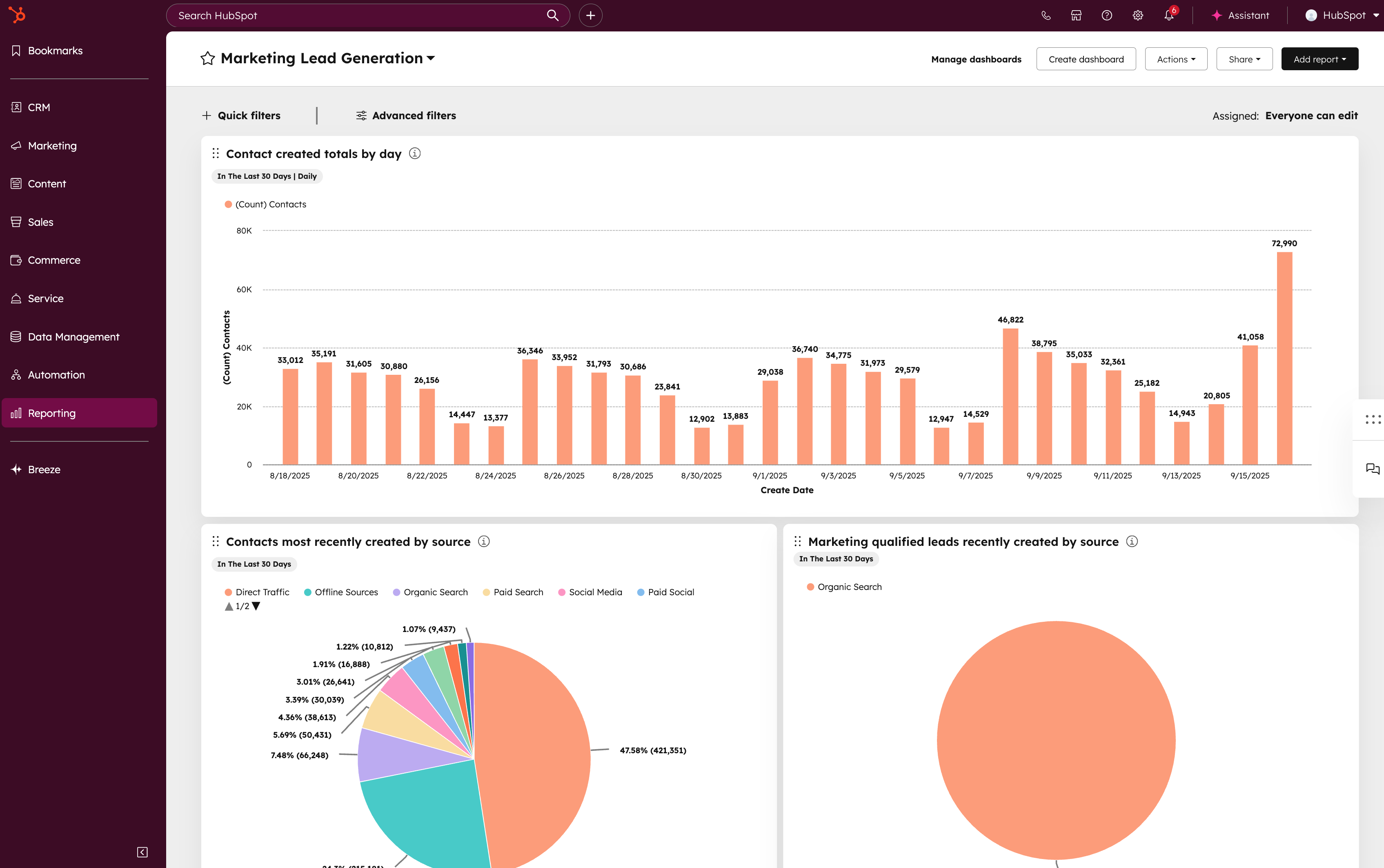
HubSpot Data Hub (formerly Operations Hub) provides advanced reporting and data management tools for multi-location coordination. Over 4,000 nonprofits, including the World Wildlife Fund and the Brookings Institution, use HubSpot for operational coordination.
Step 1: Create Dashboard Views
Build custom dashboards in HubSpot for different stakeholders. Create executive dashboards showing total members served, donor retention rates, and revenue trends. Build program coordinator dashboards displaying attendance patterns, engagement scores, and at-risk member lists. Design fundraising dashboards tracking pipeline value, donor acquisition costs, and campaign performance.
Step 2: Set Up Data Sync
Use Data Hub to sync data between HubSpot and other systems. Connect accounting software to sync donation records. Integrate volunteer management platforms to track volunteer hours. Link event management tools to capture registration and attendance data.
Step 3: Configure Automated Reporting
Schedule recurring reports that automatically email to stakeholders. Set up weekly attendance reports for program coordinators, monthly donor reports for development teams, and quarterly impact reports for board members. Configure reports to include trend analysis and year-over-year comparisons.
Step 4: Build Data Quality Workflows
Create workflows that maintain data integrity. Set up automated alerts when contact records lack required fields. Build workflows that standardize data entry formats for phone numbers, addresses, and member IDs. Configure duplicate detection rules that prevent record duplication.
Implementing Time-Sensitive Fundraising Campaigns
According to Nonprofit Tech For Good, appeal campaigns now raise 75% of revenue by Week 4, reaching peak performance two weeks earlier than in 2023 through matched giving periods, personalized segmentation, and cross-channel strategies.
Step 1: Set Up Campaign Timelines
Build campaign workflows with date-based triggers. Create sequences that launch pre-campaign teasers, opening day announcements, mid-campaign updates, urgency messaging in the final days, and post-campaign thank-you communications. Use workflow delays to control the exact timing between touchpoints.
Step 2: Configure Matching Gift Tools
Create custom properties to track matching gift eligibility and deadlines. Build workflows that automatically notify donors when matching opportunities are available. Set up real-time campaign progress tracking that shows matching gift utilization on donation pages.
Step 3: Implement Segmented Messaging
Build separate email sequences for different donor segments. Create versions for first-time donors, lapsed donors, repeat donors, and major donors. Utilize HubSpot's personalization tokens to adjust suggested giving amounts based on a donor's donation history.
Step 4: Track Campaign Velocity
Create real-time reports that monitor campaign performance against goals. Set up automated alerts when campaigns hit percentage milestones. Build dashboards that track donations by hour during critical campaign periods to identify momentum patterns.
Planning Your HubSpot Implementation
British Red Cross Training increased revenue by 66% within two years after implementing HubSpot, achieving 69% ROI in the first 12 months (Source: HubSpot).
Step 1: Identify Your Priority Metric
Choose one primary metric to improve: member retention or donor retention. This determines which HubSpot features to implement first. Member retention requires attendance tracking, engagement scoring, and re-engagement workflows. Donor retention requires stewardship automation, behavior-based segmentation, and recurring giving infrastructure.
Step 2: Plan Phased Rollout
Avoid migrating all systems simultaneously. Boys & Girls Clubs of America onboarded new locations in under 90 days by implementing core functionality first, then adding advanced features incrementally. Start with CRM setup and basic workflows, then add Marketing Hub automation, followed by Sales Hub pipelines and Service Hub tracking.
Step 3: Set Up Training Protocols
Create HubSpot training documentation specific to your Club's workflows. Use HubSpot Academy's free certification courses to train staff on core features. Build custom training videos that show your specific setup for member registration, donor management, and reporting access.
Step 4: Establish Data Migration Process
Clean existing data before migration. Remove duplicates, standardize formatting, and verify contact information accuracy. Create a migration checklist that includes member records, donor history, program enrollment data, and communication preferences. Test migrations with small batches before full implementation.
If you’re considering HubSpot but unsure how it should be structured for a multi-location Club model, a short architecture review can prevent costly rework. Tapp Network helps nonprofits map CRM structure, data models, and rollout phases before any build begins. Reach out to schedule a HubSpot readiness review tailored to your organization.
Measuring Success with HubSpot Analytics
Step 1: Define Key Performance Indicators
Establish baseline metrics before implementation. Track current member retention rates, donor retention percentages, average donation amounts, staff hours spent on administrative tasks, and program enrollment trends. These baselines determine ROI measurement.
Step 2: Build Attribution Reports
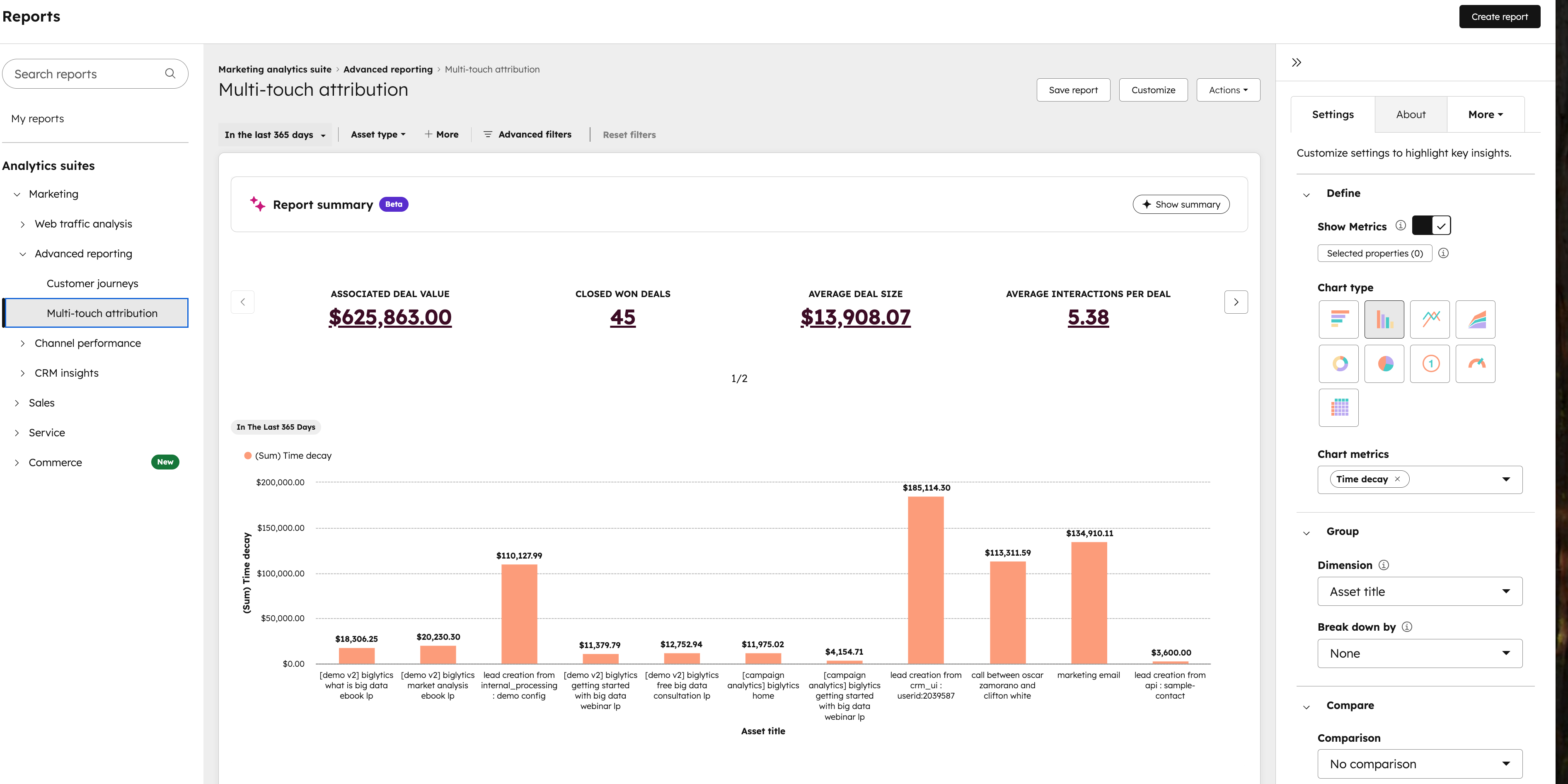
Use HubSpot's attribution reporting to track which touchpoints drive member enrollment and donations. Set up multi-touch attribution models that show the full journey from first website visit to program registration or donation completion. Identify which channels and campaigns generate the highest conversion rates.
Step 3: Monitor Workflow Performance
Track workflow enrollment, completion rates, and goal achievement. Identify bottlenecks where contacts drop out of sequences. Test workflow variations to improve engagement rates. Review workflow analytics monthly to optimize timing, messaging, and triggers.
Step 4: Calculate Time Savings
Measure staff hours saved through automation. Compare the time spent on manual processes before HubSpot to automated workflow execution after implementation. Calculate the value of redirected staff time toward program delivery and member interaction.
Getting Started with HubSpot
HubSpot offers nonprofit discounts that make implementation accessible for Boys and Girls Clubs. Start by signing up for HubSpot's free CRM to test basic functionality. Explore nonprofit pricing for Marketing Hub, Sales Hub, and Service Hub based on your priority metrics.
Connect with HubSpot's nonprofit program to access discounted pricing tiers. Review HubSpot Academy's free training resources to build internal expertise. And if you're looking for a partner, Tapp Network has been a certified agency for more than 10 years, and we specialize in nonprofit implementations for accelerated setup. Reach out to us to schedule a consultation or to schedule a workshop.
Focus implementation on one high-impact workflow first. Build momentum through early wins that demonstrate value to staff and stakeholders. Expand HubSpot usage incrementally as team competency and system sophistication grow together.